


A financial report is a production job as much as an analytical one. The numbers have to be gathered from across the portfolio, the commentary written, every figure reconciled against its source, and the whole thing held together through many versions before it reaches an investor. AI has started to take real work out of that cycle, though not evenly, and not always where the noise suggests.
The gains cluster at two ends of the cycle. AI and the tools around it speed up the data work at the front and the first-draft commentary in the middle, while the back end (reconciling figures, controlling versions, and shaping the report for each reader) is where a document tool does the work.
Consolidating the Data
Reporting starts with data that lives in too many places, from portfolio company submissions to fund administrator feeds to spreadsheets that each use their own format, currency, and period. Pulling it into one clean set is the least glamorous and often longest part of the cycle.
Data preparation tools such as Alteryx can take in multiple sources, standardize formats, and flag mismatches for your team to resolve. When portfolio companies send their quarterly reports as PDFs, UpSlide’s AI-powered PDF to Excel extracts tables and financial data straight into Excel, so nobody has to retype them.
Checking Every Figure for Consistency
Once the data is in, the most common failure in a finance report is a number that doesn’t agree with itself, whether that’s a figure in a table that a later draft has moved, or a total in the commentary that no longer matches the chart it refers to. These errors often go unnoticed until the report reaches a reviewer, or an investor.
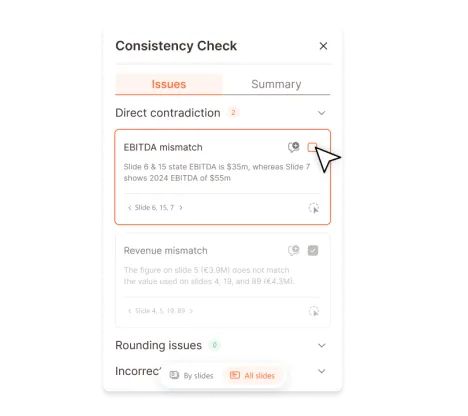
UpSlide’s AI Consistency Check scans the text, tables, charts, and images in a PowerPoint report. It flags figures and commentary that don’t match from slide to slide, along with miscalculations, so your team can fix them before the report moves on.
At Park Square Capital, the Performance team now saves 4.5 hours on each performance report and runs AI Consistency Check as a formal review step before materials are finalized.
Drafting the Commentary
Writing the narrative is one of the slower jobs in the cycle, and much of it is descriptive: what moved since last quarter, why a holding’s numbers changed and what it means for the fund. AI assistants like Claude and Copilot now produce a usable first pass from the underlying figures, so the team edits rather than starts from nothing.
The judgment still needs a person. A model can report that revenue fell without knowing a large client left mid-quarter, or call a margin healthy when a one-off payment inflated it.
With UpSlide’s MCP server, AI assistants like Claude can use UpSlide’s features directly. MCP (Model Context Protocol) is the open standard AI assistants use to work with other software, so you can ask them for what you need in plain language.
For reporting teams, the biggest gain is in the figures. AI assistants like Claude can link the tables in your model to the report, refresh every link when the new period’s numbers come in, list any links that are broken or out of date, and open the Excel source behind a chart so you can check where a number came from. They can also lay out new pages with your approved layouts and pull standard slides and disclaimers from your Library.
Variance and Performance Analysis
Comparing this period against the last across a set of holdings is a volume problem, and AI handles that volume well. Tools that take in current and prior figures can flag every movement past a threshold, rank them by size, and summarize what changed, so an analyst reviews the exceptions instead of every line. That work usually happens in Excel, and the risk is in the handoff – a number that’s right in the model can arrive wrong in the report if it’s retyped by hand. UpSlide’s Excel Link keeps the model and the report connected, so an updated figure carries through without being rekeyed.

Keeping Versions Under Control
A report is rarely written once. It goes through rounds of edits as contributors and reviewers weigh in, and every round is a chance for a figure or a line to drift from the last agreed version. Tracking that by hand, across a team working to a deadline, is where the audit trail usually breaks. UpSlide’s Track Changes records what changed between versions, in the same way that finance teams already rely on in Word, so the history is there without anyone maintaining it, and sign-off happens against a clear record rather than memory.
Tailoring the Report for Each Reader
One set of numbers usually has to serve several audiences, each wanting a different cut – the board, investors, and internal teams don’t read the same way. AI can spin reader-specific versions out of a single source and adjust the language for each, and UpSlide’s Library keeps that from starting cold each time, holding one approved set of slides, tables, and disclaimers so every version is on-brand and current before anyone edits a word.
Risks of Using AI in Financial Reporting
Before you bring AI into your reporting cycle, plan for four risks.
Accuracy
The biggest risk sits in the commentary. An AI first draft can sound authoritative and still be wrong on the substance, and in a financial report that damages credibility. Every drafted section needs a reviewer who knows the business well enough to spot what the model can’t, such as a one-off item distorting a trend.
Deterministic tools matter here too. An AI model is probabilistic: give it the same request twice and the results can differ slightly. That works for a first draft of commentary. For the figures themselves, use tools that produce the same result every time, because a report that’s mostly consistent can still put a wrong number in front of investors.
Data Security
Reporting data is most sensitive in the period before results are released. Check that any AI tool handling it meets your firm’s existing standards for security, encryption, and access control, and settle this before the tool goes near a live reporting cycle.
Cost
Every request to an AI assistant uses tokens, and providers charge for them. Rebuilding tables or updating figures through an assistant uses many more tokens than a purpose-built tool, and recurring reports repeat that spend every month or quarter. In UpSlide’s internal testing, Claude with the UpSlide MCP created an Excel link for 80% fewer tokens than Claude working alone. UpSlide’s native Excel links don’t use any tokens.
Regulation and Assurance
Guidance on using AI in regulated reporting is still changing. A vendor saying its tool is compliant doesn’t mean it meets your firm’s reporting obligations, so involve compliance and audit early.
Getting started with AI in financial reporting
Reporting automation works best when it starts narrow rather than everywhere at once, with one contained task making the case before the next.
Consistency checking is a sensible first step: because success is unambiguous, the figure in the commentary either matches the source or it doesn’t, and none of it touches the judgment in the report. Version control and reader-specific formatting are natural follow-ons, each a defined process with a real cost attached and proven tools available. Make sure to get compliance and IT involved from the start, alongside the reporting team, so the security and assurance questions are settled before a tool is chosen.
UpSlide sits at the production end of this, across consistency checking, version control, reader-specific reporting, and the Excel-to-report handoff. Our UpSlide for Finance and Reporting Teams page shows what that looks like for the teams producing these reports.
FAQs
Which AI tool is best for financial reporting?
There isn’t a single best one, because the cycle has distinct jobs. Data-preparation tools handle consolidation, general-purpose assistants draft the commentary, and a document tool like UpSlide handles the consistency, version control, and formatting that turn a draft into a report. The right question is which step you’re trying to improve, not which tool wins overall.
Will AI replace the teams that produce financial reports?
No. AI mainly takes on the repetitive parts of the cycle, consolidating data from several sources, drafting first-pass commentary, and flagging the movements worth explaining in variance analysis. It’s strongest on the high-volume, well-defined work, which leaves the reporting team more time for the judgment and review the report actually depends on.
Can AI be trusted to write financial reports on its own?
No. AI can produce a solid first draft and catch inconsistencies faster than a manual review, but a financial report has to be accurate, reconciled, and signed off by someone accountable for it. It’s dependable for speeding up the drafting and the checks, though the report still needs a person accountable for the final sign-off.