


If you work in deal advisory, you know the deliverable is the product. A pitchbook wins the mandate, an information memorandum (IM) moves the deal, and a due diligence report tells your client what they’re buying. Each one gets judged the moment it lands, usually against a tight deadline.
AI now gets your team to a first draft of these documents much faster. Yet, the finished version still has to be accurate, on brand, and client-ready before it leaves the firm, and that part still takes work.
In this guide, we cover the main benefits of AI across the deal cycle, the risks to plan for, and how to get started.
Research and Data Gathering
Before your team builds a pitch or starts a diligence exercise, someone has to gather the raw material: company financials, comparable transactions, sector data, and precedent deals. In transaction services, that can mean working through a data room with thousands of files.
This is often the first place AI saves a deal team time. AI tools can:
- Extract figures from a set of accounts.
- Summarize a target’s filings and management reports.
- Surface relevant clauses across a data room.
- Pull together comparable transactions and sector data.
Work that used to take days can now take hours, so your team starts the analysis from a more advanced position.
First Drafts of Pitchbooks, IMs, and Reports
Assembling the first version of a pitchbook, IM, or due diligence report from research, prior deals, and template content takes hours of analyst time before any of the thinking starts.
AI assistants like Claude and Copilot can now turn that source material into a structured starting point in minutes. The draft still needs to look like your firm’s work, though, with the right templates, layouts, and approved content.
UpSlide’s MCP server connects AI assistants to UpSlide to solve this problem. MCP (Model Context Protocol) is the standard that lets an AI assistant use an external tool in the middle of a task. You describe what you need in plain language, and your AI assistant uses UpSlide’s features to do it.
For example, Claude can build slides from your approved layouts, pull slides, bios, and logos from your Library, and create Excel links from your model. When the numbers change, it can refresh every link in the deck and flag any that are broken, so your figures stay accurate as the draft takes shape.
Financial Modeling and Valuation
Valuation models, comparable company analyses, and leveraged buyout (LBO) models sit at the heart of M&A and transaction services work. AI-assisted tools now speed up the mechanical parts, such as:
- Building a first-pass model from a data room package.
- Populating assumptions from historical financials.
- Checking consistency across sheets.
- Testing more scenarios than a manual build allows.
These gains only count if the numbers stay correct on the way into the client document. A figure that’s right in the model and wrong on the pitch slide still reaches the client wrong.
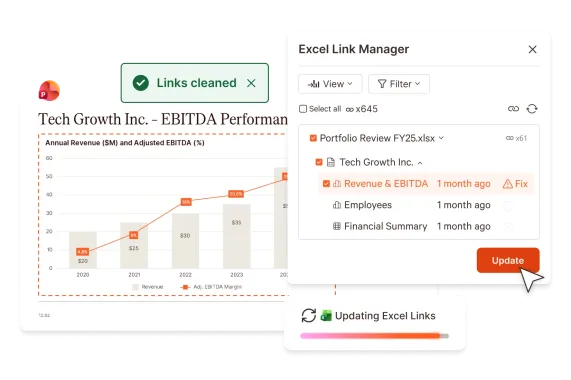
UpSlide’s Excel Link connects figures, tables, and charts in your model to PowerPoint and Word. When the model changes, you update every linked item in one click, so nobody has to rekey a number.
Reviewing Reports and Presentations
Advisory documents are long, built by several people, and edited right up to the deadline. Due diligence reports often run 50 to 200 pages, and that’s how inconsistencies creep in:
- An EBITDA figure in the executive summary that differs from the detailed financials.
- A margin calculated two different ways.
- A chart still running on last week’s numbers.
- A total in the commentary that no longer matches the table.
Each one is easy to fix once you spot it. Finding all of them by hand, the classic tick-and-tie, can take the better part of a day.
UpSlide’s AI Consistency Check scans the text, tables, charts, and images in a PowerPoint deck. It flags figures and commentary that don’t match from slide to slide, along with miscalculations. It can cut review time by up to 50%, so senior reviewers can spend their time on the narrative and the valuation.
Moreover, because these documents go through round after round of edits, UpSlide’s Track Changes shows what changed between two versions of a PowerPoint deck, across text, tables, charts, and Excel-linked items. Reviewers can accept or reject edits from the same pane.

Less Time Spent on Document Production
A lot of what a deal team does to a document isn’t analysis. It’s reformatting slides, rebuilding charts to house style, and tracking down the approved version of a disclaimer or a team bio from the last deal. That work usually lands on juniors, and it adds up across every deal.
UpSlide’s Library gives your whole team one approved source for slides, charts, disclaimers, and bios. Nobody rebuilds what already exists or chases another team for the current version.
Active users at UpSlide’s financial advisory clients save eight hours a month on average, and teams that use UpSlide fully save up to 26 hours per person each month. That’s time your team can put back into the deal.
Limitations and Risks to Keep in Mind
AI brings clear benefits, but advisory firms need to plan for four main risks.
Accuracy
In advisory, the biggest risk is a wrong number reaching a client. AI-drafted sections and AI-built models can look authoritative and still be wrong, and an error in a client document reflects on the advice itself. Someone who understands the deal behind the numbers should review every AI-drafted section and every AI-assisted model.
This is also why deterministic tools still matter. AI models are probabilistic, so the same request can produce a slightly different result each time. A draft that’s 80% consistent is a good start, but in a financial document it still contains errors. For business-critical data, such as the figures linking your model to your deck, use tools that do exactly the same thing every time, so you don’t have to check the AI’s work line by line.
Data Security
Advisory teams hold some of the most sensitive information in a transaction, and that information is most exposed before a deal is announced. Any AI tool that handles deal data should meet the same security, encryption, and access control standards your firm already applies to its deal systems. Settle these questions before a tool touches deal data.
Cost
AI assistants charge by usage, measured in tokens, and asking one to rebuild a table or update figures across a long deck uses a lot of them. Across a whole firm, that spend adds up quickly. Routing repetitive tasks to purpose-built tools keeps it under control. In UpSlide’s internal testing, creating an Excel link with Claude and the UpSlide MCP cost 80% less in tokens than asking Claude alone, and UpSlide’s native Excel links use no tokens at all.
Regulation
Guidance on AI in financial and professional services is still changing. A vendor’s compliance claim doesn’t prove a tool fits your firm’s obligations, so bring compliance and IT into the evaluation from the start.
How to Get Started with AI in Financial Advisory
You don’t need to roll out AI across every team at once. Here’s a simple way to start:
- Pick one repetitive, well-defined task. Document production is a good first candidate. The workflow is clear, the cost is measurable, the output is high-volume and high-stakes, and the automation options are mature.
- Measure the result. A clear win on pitchbook production or financial due diligence (FDD) reporting makes the case for the next step.
- Involve compliance and IT early. Security, data, and regulatory questions cost far less to answer before you choose a tool than after.
- Expand from there. Use what you learn in the first workflow to choose the next one.
UpSlide sits at the production stage of this work, across financial modeling, document consistency, and version control for pitchbooks, IMs, and reports – Advisory firms like KPMG and Riveron already use it.
Our UpSlide for Advisory page shows how M&A, transaction services, tax, and consulting teams put it to work across pitches, due diligence, and valuations.
FAQs
What are the main benefits of AI in financial advisory?
For corporate advisory teams, the main benefits are faster research, quicker first drafts, and quicker financial modeling, along with less time spent turning those drafts into client-ready deliverables. Across all of them, AI takes on the repetitive work so the team has more time for the analysis and judgment a client is paying for.
Which advisory teams benefit most from AI?
The teams producing high volumes of complex, client-facing documents see the clearest gains, from M&A and transaction services to tax and consulting. These teams build pitchbooks, information memoranda, due diligence reports, and valuation models under tight deadlines, which is the kind of high-stakes, document-heavy work where AI helps most.
Is AI replacing financial advisors?
No. AI handles the research, drafting, and production that used to absorb a team’s time, but the analysis, client relationships, and accountability the firm is paid for stay with people. The firms getting the most from it treat AI as a tool for their advisers rather than a replacement for them.