


Many associate the Microsoft tool with headaches from crunching numbers and tedious charts but there’s more to the spreadsheet-making program than you think. Microsoft Excel may only be 30 years old, but it feels like it’s been around forever and rightly so. Whether it’s at school, at work, or at home, we’ve all used it multiple times and developed a love-hate relationship with Excel.
With more than one billion users worldwide, we wanted to celebrate all the incredible things about Excel which you may not know. Whether it’s an impressive map visualization or aesthetically pleasing works of art, Excel shows that beautiful graphics don’t always require fancy software.
Create Beautiful Pieces of Art
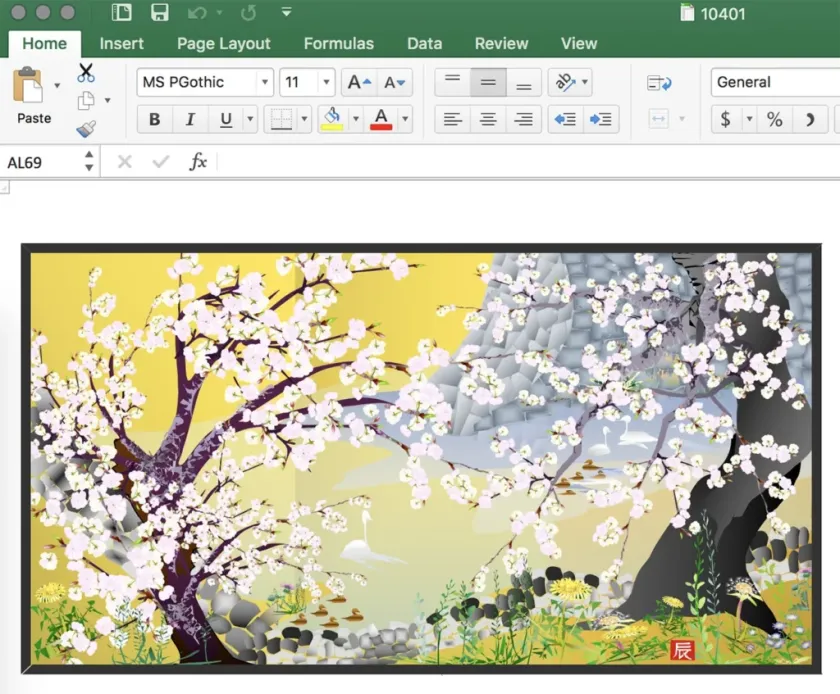
A 74 year old man, by the name of Tatsuo Horiuchi, has discovered a new way of creating beautiful pieces of art in Excel. Horiuchi said he has never used Excel for any other purpose and first started using it because it was free and pre-installed! Horiuchi uses autoshapes in Excel and layers custom colored shapes to create the image. All his work is online and has also been featured in museums.
Did you know?
There are over 1 billion users of Microsoft Excel worldwide
Create a Full-Length Role Playing Game

Cary Walkin, an accountant from Canada, created a full-length role-playing game using an Excel workbook. He created Arena.Xlsm in five months, and released it in March 2013. It features 2,000 potential enemies and a storyline with four different endings, based on how the user navigates the game.
Did you know?
The first version of Excel was released for Mac in 1985
Convert Any Photo into an Excel Spreadsheet
Pixel Spreadsheet, designed by Think Maths, allows you to convert any photo into an Excel spreadsheet. Think Maths describes the process as “cracking the digital photo file open, scraping out all of the numbers and putting them into the cells of an Excel spreadsheet.”
Create a Musical Animation in Excel
Joe Penna, also known as MysteryGuitarMan on YouTube, gave a whole new meaning to Excel spreadsheets in his 2012 music video. He made the stop-motion animation entirely in Excel, and it ultimately went viral.
Create a Sudoku in Excel
McPherson offers an explanation of how he put the tool together on his website, and if you’re looking to dig deeper into Excel — in particular using VBA — then it’s well worth reading. Sudoku fans will love this project for its functionality, but anyone can learn from the techniques that have been used to create it.
Play a Video Game in Excel
The guys over at Spreadsheet1 have built an unblocked Excel version of the viral web game 2048 by Gabriele Cirulli, you can play online or off-line in 2D or 3D. Every game move is logged in a worksheet for potential strategy analysis using controls in the Ribbon. The Game can also be saved and resumed later (just save workbook). Thanks for the tip Peter!
Create 3D Dancing Pendulums

In Excel a Pendulum can easily be represented on an Excel Scatter Chart as a single series consisting of two points with a joining line however, the guys at Chandoo.org have managed to create amazing 3D dancing Pendulums! Thanks for the tip Ian!
For more impactful ways to use Excel in financial services, including how to link Excel data to PowerPoint or reduce your Excel file size, discover our Knowledge Hub.
