


AI assistants like Claude, ChatGPT and Copilot are transforming how financial services teams build key documents. Firms are at different stages of adoption today, but within 12 months, most will have embedded at least one for every employee.
The benefits are real for financial services. Faster drafts, deeper analysis, less time orchestrating information and more time thinking and executing the work that actually gets the deal over the line.
But the speed of change creates a genuine challenge for those selecting and implementing technology across advisory, banking and investment firms. Will AI assistants eventually produce client-ready deliverables such as FDDs, IMs, and fund reports end-to-end? It’s a reasonable question, and many buyers are choosing to wait for the answer rather than commit. But waiting means missing the window to prove value before the next round of AI investment decisions land.
Over recent months, we’ve had hundreds of conversations with finance leaders actively evaluating solutions, watching demos, running pilots, and figuring out what it takes to build AI workflows their teams and clients can trust.
One thing is becoming clear – the gap between what AI assistants can do and what financial services firms actually need is closing in some areas, initial financial modeling, for example. But in others, it’s widening. Output consistency remains unpredictable, response times are slow, and pricing is still too opaque to build budgets or hiring plans beyond the next six months. And some gaps were never going to close at all.
TL;DR
AI assistants are now a fixture in financial services document workflows, but they were built for breadth, not precision. Output inconsistency, ungovernable formatting, and chat-first interfaces create real problems when documents need to be client-ready.
The next model release won’t close these gaps. The integrations, deterministic logic, and finance-specific controls required to solve them are low-margin, narrow-market problems that general-purpose platforms have no commercial reason to build.
What’s missing is a document production layer. Finance teams have been absorbing this cost for years – manual checking, reformatting, version control – without naming it. That’s the gap UpSlide fills, connecting directly to AI assistants via MCP, letting AI generate content while UpSlide ensures it lands as a client-ready document.
The smart approach isn’t to wait or go all-in on AI alone, it’s to use AI assistants for drafting and analysis, and pair them with purpose-built tooling for precision, governance, and auditability.
Where AI Assistants Fall Short for Finance Teams Today
Problem 1: Pure AI Inference Produces Inconsistent, Ungovernable Output
In financial services, the stakes for documents are higher than almost any other industry. A figure that doesn’t reconcile across a quality of earnings report can stall a deal, shake buyer confidence, or trigger hours of costly rework at exactly the wrong moment. Determinism is non-negotiable.
Pure-play AI, on the other hand, is inherently probabilistic. The same analyst running the same prompt twice will likely get two different outputs. The polish AI applies makes that even harder: a well-formatted slide with contradicting numbers is far more likely to slip through than a messy one.
That creates a real governance problem. Who changed what, when, and on what basis? If you can’t answer those questions quickly and confidently, the document becomes a liability.
Brand consistency sits in the same bucket. A client receiving documents from an MD in Frankfurt and an analyst in New York should be able to tell they came from the same firm. AI, without guardrails, makes even that harder to guarantee.
In an industry where documents are a direct embodiment of the value on offer, any error that reaches a client reflects on the service and judgment they can expect.
The solution isn’t a better prompt, it’s using the right tool for the right task.
Problem 2: Chat Interfaces Aren’t Built for Taking Action at Pace
A wall of text in a chat window is not an actionable output. Picture the scene: you prompt your AI assistant to review your pitchbook for inconsistencies. It comes back with a list of errors. EBITDA figures on slides 4, 25, 26 and 57 are inconsistent. What follows is 20 minutes of manual work trying to locate, investigate and fix the errors.
This isn’t a failure of the technology, but rather a mismatch of purpose. AI assistants are built for breadth, serving millions of users across thousands of different tasks. Finding a discrepancy on slide 57, or tracking version-to-version changes, isn’t what they are optimized for.
Being embedded in M365 helps, but it doesn’t close the gap. A chat interface inside Word or PowerPoint is still a chat interface. Context switching, back-and-forth prompting for every output, and loss of focus mid-task don’t disappear just because the tool lives within the same application.
Prompt quality adds another layer of friction. In a general-purpose interface, output is only as good as the person running it. Skills can help, but maintaining them consistently across a large, dispersed firm is a governance burden most teams underestimate.
Finance teams need tools deeply embedded in their workflows, built for the tasks they run every day, that deliver predictable, actionable results at the click of a button.
Problem 3: AI Costs Are Scaling Faster Than Anyone Projected
For years, IT teams have been used to the predictability of per-user SaaS pricing. Consumption-based AI billing is a different proposition entirely.
Token prices are falling, but consumption is outpacing them, and the net result is an ever-increasing AI bill. According to Benchmarkit and Mavvrik’s 2025 State of AI Cost Governance report, 80% of enterprises are already missing their AI infrastructure forecasts by more than 25%, with 84% reporting gross margin erosion tied to AI workloads. Adoption is indeed accelerating, but the tasks AI assistants are used for are growing more complex; agentic workflows consume multiples of what a simple prompt did a year ago.
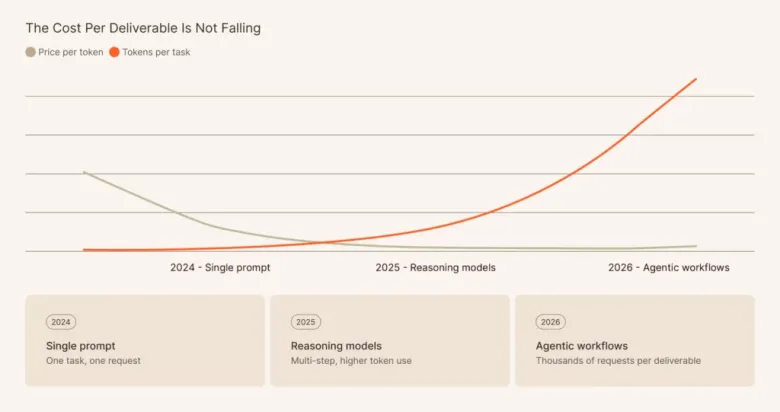
And there’s little reason to expect relief. Anthropic and OpenAI are both heading toward public listings with revenue tied directly to usage, so expecting token pricing to become meaningfully cheaper or more predictable anytime soon is optimistic.
So, as AI spending shifts from innovation budget to operational cost, it should be treated as a selective resource, not a default one. AI assistants excel at researching, synthesizing information, structuring ideas and accelerating a first draft. For everything else, purpose-built, deterministic tools are likely to be faster, cheaper, and more reliable. Using a frontier model to reformat a slide or apply a template isn’t just wasteful. It’s the wrong tool for the job.
None of this is an argument against AI. The technology is genuinely exciting, but assuming it can – and should – do everything is how firms end up with impressive-looking AI tech stacks that quietly underdeliver on the R of ROI with cashflow impacts from eye-wateringly large token bills.
Why the Next Model Release Won’t Fix This
The Incentives Don’t Point in This Direction
Closing this gap would require deep M365-native integrations for financial workflows, firm-specific brand asset libraries, and deterministic execution paths for formatting, data linking and audit trails. These are vertical, low-margin problems that benefit a narrow slice of the market.
The interface gap is just as permanent; building task-specific controls inside PowerPoint and Excel only pays off when you serve one industry deeply. A platform serving millions of users across thousands of tasks will always default to the chat window, because that’s the only interface that works for everyone.
Microsoft has gone further than anyone in embedding AI into M365, and Copilot still can’t apply a firm-specific template consistently across a 60-slide deck or run a finance-grade consistency check before a document goes to a client. That’s a deliberate tradeoff made by a platform built for the broadest possible audience.
Building the Solution Would Likely Undercut Their Own Business Model
The deeper issue is structural. The best results for specialized work rarely come from a single call to one large model. They come from combining task-specific models, deterministic logic and AI only where reasoning is genuinely needed. For a platform built around one general-purpose model, that kind of orchestration runs against the grain of the entire product.
The economics point the same way; every major AI platform is built on consumption, and deterministic tools that reduce token usage undermine that. This is a commercial reality that firms need to factor in: waiting for OpenAI or Anthropic to solve the precision and cost problem means waiting for them to act against their own interests.
The Missing Layer, and How to Fill It
AI assistants have transformed how finance teams get to a first draft, but what they haven’t changed is everything that comes after. That’s the gap a document production layer fills.
Most finance teams don’t know this category exists, because they’ve been absorbing the cost without naming it. The workarounds are familiar: side-by-side checking, manual calculations and painstaking reformatting. Every hour spent on this quietly erodes the efficiency gains AI was supposed to deliver.

UpSlide connects to AI assistants directly via MCP (Model Context Protocol), an open standard that lets Claude or Copilot call on external tools and data sources mid-task without switching platforms. The result is a workflow where each layer does what it does best. In practice, that leads to materially better outcomes.
The AI assistant stops starting from zero. Today, every prompt starts blind: your firm’s templates, approved disclaimers, or live deal data don’t exist in the model’s context unless someone manually puts them there. Via MCP, UpSlide’s asset and template libraries are available to the assistant as it builds; the right template is applied from the start and the right disclaimer is pulled every time. The deck that comes back already looks like it came from your firm, and it remains that way through each iteration.
Orchestration routes the right task to the right tool. An analyst prompting Claude to refresh 47 live Excel links across a fund report is using a language model to perform a deterministic task: slowly, expensively, and with an unnecessary risk of error. UpSlide’s orchestration layer changes that.
- LLMs stay focused on drafting and analysis.
- Deterministic algorithms handle data linking and updates, governing what is refreshed and when.
- Purpose-built AI agents take care of repeatable tasks, like running a consistency check automatically before a document moves to the next review stage, without tedious and unreliable prompting.

Results are immediate, intuitive and friction-free. Copilot and Claude both operate inside M365, but they still rely on a chat interface: the user prompts, interprets, and then manually acts on the output. UpSlide works differently. A consistency check doesn’t produce a wall of text to work through – it flags the error directly on the slide, with rationale, ready to act on in one click. Version changes appear in a dedicated pane alongside each slide, showing exactly what moved and when.
Nothing ships without full visibility and control. AI assistants generate, they don’t govern. UpSlide shows exactly what data was updated, the source file and when it was last refreshed across every linked figure in the document. Every change is visible, every step reversible, with a full audit trail before anything reaches a client. You control what gets updated and what doesn’t, with complete confidence, before it goes out the door.
For a deeper look at how UpSlide supports each stage of the document lifecycle, from first draft to final send, read our full breakdown here.
The Smart Bet in an Uncertain Market
Let’s return to the question we started with. Will AI assistants eventually produce a client-ready pitch or FDD end-to-end? Our bet, and that of most finance leaders we speak to, is no. Not because the technology isn’t impressive, but because it’s an architecture question, not a roadmap one. The structural gaps aren’t closing – the incentives just do not exist.
But waiting to find out carries its own risk, and so does going all-in on the wrong approach. S&P Global’s 2025 survey found that 42% of enterprises abandoned most of their AI initiatives last year, up from just 17% in 2024, with cost overruns and governance failures cited as the primary reasons. The firms pulling ahead aren’t abandoning AI, they’re being smarter about how they deploy it.
That means using general-purpose AI assistants for what they do genuinely well: researching, structuring, synthesizing, and accelerating the first draft. And pairing them with UpSlide for everything after. A specialist document production layer that combines AI, machine learning and deterministic execution to solve the precision, compliance and control problems that general platforms were never designed to touch.
The result is a tech stack that doesn’t over-rely on any single tool. Speed to draft from AI assistants; precision, quality control and auditability from UpSlide where it matters most. Lower, more predictable costs and a setup built to flex: if the best model shifts from Claude to Copilot to something that doesn’t exist yet, the controls, compliance and consistency that make your documents client-ready shift with it.
Speed to first draft is solved. The firms that get ahead will be the ones that figure out everything that comes after it, before their competitors do.
Curious how a document production layer works alongside the AI tools you’re already using? Talk to our team.

